Home / Guides / Your first Earn subscription on mobile
Your First Earn Subscription on Mobile, in Order
The tapping takes under a minute. The awkward part is the few lines of small print to read before you confirm. This walks the order, and says which steps not to skip.
This assumes you already have an account, passed identity verification, and have USDT in your Spot wallet (the swapping step is in the common routes into USDT). Missing any of the three, go back to opening an account and getting verified first.
What's in here
- The order of operations
- The four lines of small print to read before confirming
- The interface changes; these things don't
- Keeping the risk small on a first attempt
- What the numbers on the position row mean
- The way back out
- When a subscription fails, or the numbers do not add up
- Three mistakes to avoid on a first subscription
- Desktop or mobile
- What to check in the first month
The order of operations
-
Find the Earn entry
The app home's function area has an "Earn" entry; its position shifts between versions, so if you can't find it, use the search box at the top and search the product name. The search box is the entry least affected by redesigns.
-
Search the coin you want to deposit
Search USDT directly and the list will show Flexible, Locked and other products. Read which category each row is before anything else, and don't just pick the biggest APR. The way to tell is in the list's column headers: a row with a "Duration (Days)" value is Locked; one where that cell is blank or says flexible is Flexible.
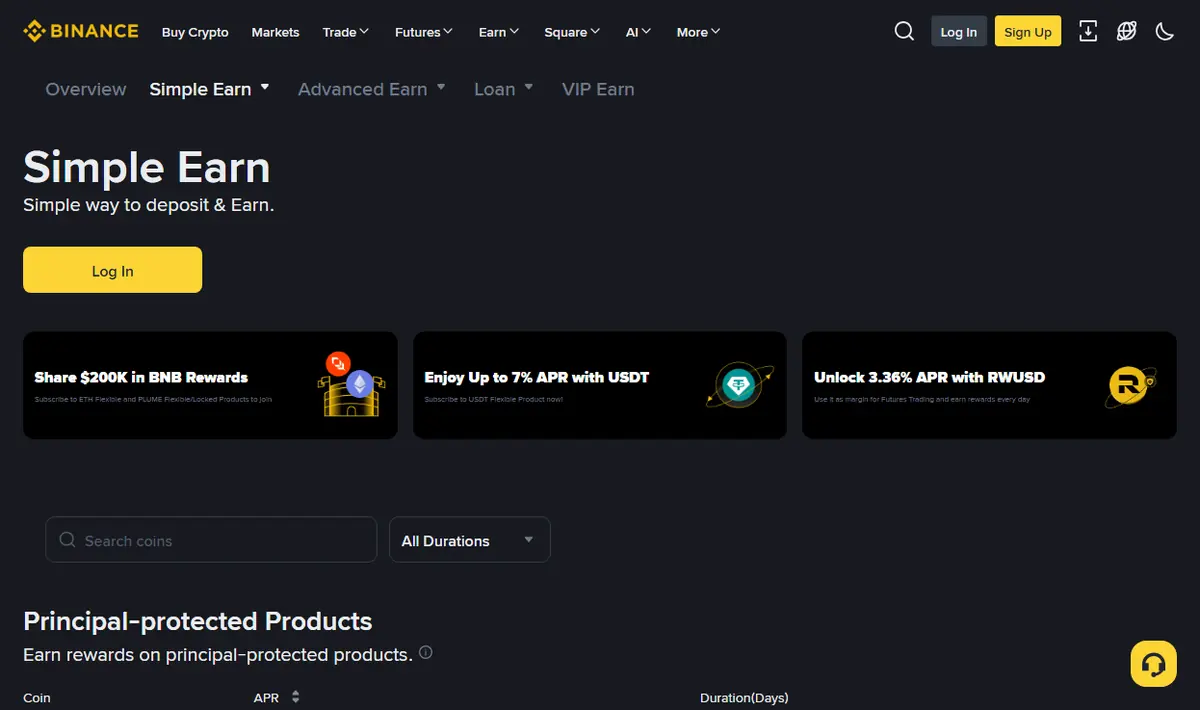
Binance Simple Earn page, English (captured 2026-09, web, logged out). The mobile app lays this out differently, but these three things are the same: the search box at the top, the durations filter, and the "APR" and "Duration(Days)" columns in the list; that last column is how you tell Flexible from Locked. Note that Binance's own label for this section is "Principal-protected Products", which refers to the principal being returned in the same coin; it is not a guarantee against platform or issuer risk. The interface changes between versions, so go by what you see when you open it. -
Open the product page and read the terms through
The most important step in this whole article, expanded in the next section. Two extra minutes here avoids weeks of being stuck later.
-
Enter an amount and confirm
On a first attempt, use a small sum. What this step verifies is the flow itself and the rhythm of the credits; the size of the amount is beside the point.
-
Come back after the first payout
The next day, check whether the Flexible balance has grown (Real-Time APR); the Tiered APR payout to Spot only lands on the second day after you subscribe, as explained below. Check whether interest arrived and how much. Working the accrual rule backwards from that real number is far more informative than reading the terms.
The four lines of small print to read before confirming
One: is this Flexible or does it have a term
Flexible and Locked often sit next to each other in the list and the icons look similar. Check whether the row has a number of days; if it does, it's Locked.
But "Locked" doesn't necessarily mean you can't get it out: some Locked products currently support early redemption, at the cost of the rewards already distributed being deducted, and Binance's Locked products FAQ says the assets are returned to Spot within 72 hours. Others don't support early redemption at all, and the page says so. So what this step really confirms is two things: whether there's a term, and which of the two kinds this particular product is. Getting that wrong costs far more than picking the wrong APR.
Two: what the cap on the high rate is
Where it says "X% on the first N coins", anything above that earns the base rate. If you plan to deposit far more than the cap, what you actually receive will be well below the number on the page. The arithmetic is in how the cap on the high rate works out.
Three: which redemption rule applies
For Flexible, whether redemption is instant; for Locked, whether early redemption is possible and what it costs. The three common rules are compared in what early redemption costs.
Four: whether auto-renew is on
Auto-renew on Locked products may already be switched on when you reach this screen. If you don't want to be locked into another cycle automatically at maturity, switch it off at this step.
A small habit: after your first subscription, set a calendar reminder for the maturity date.
You won't necessarily remember on the day, and auto-renew doesn't wait for you to.
The interface changes; these things don't
Articles that write out steps have a chronic problem: one app redesign and the screenshots and paths are all out of date. So here's a different approach, the things that don't change between versions.
The search box is always the most reliable entry. The position, name and grouping of the function icons change almost every redesign, but the search box at the top stays. Remembering a product name is far more reliable than remembering a path.
There's always a confirmation screen before subscribing. However the interface changes, the last step always puts the amount, the product type, the term and the estimated return together for you to confirm. That screen is what you should be reading — the APR on the list page is promotional placement; the information on the confirmation screen is what you're actually agreeing to.
The product terms can always be expanded. There's usually an unobtrusive "product details", "rules" or question-mark icon on the page, and the full terms are inside it.
It's collapsed by default, which makes it easy to skip. But the rules that decide whether you get your money back on time are entirely inside that collapsed text. On your first subscription, expand it and read it through. It takes about two minutes.
Put another way: rather than remembering where to tap, remember what you must see before you confirm. The first goes out of date; the second doesn't.
Keeping the risk small on a first attempt
Treat the first one as a rehearsal, not an investment.
- Use an amount you genuinely don't care about. The point of this step is to see the flow. Even if it turns out you picked the wrong product type, it cost you a few dollars.
- Choose Flexible only. Don't touch anything with a term the first time. Once you're sure you can read the terms and you know the credit rhythm, consider other tiers.
- Write it down after you act. When you subscribed, which product, how much: in a note on your phone. Once you're holding several positions, this habit saves you; it's easy to lose track of where your money actually is.
- Look again two days later. By then the Real-Time APR has had time to show in the Flexible balance and the first Tiered APR payout should have reached Spot. Check whether interest arrived and how much, and while you're there, confirm you can find where the redeem button is. Being able to find redemption matters more than a successful subscription.
A security note while we're here: anything that asks you to enter your account credentials on a page outside the app, or to transfer coins to some "Earn address", is a scam. A legitimate Earn subscription happens entirely inside the app, needs no transfer to any external address, and never asks for your verification code.
What the numbers on the position row mean
Once the subscription goes through, the money moves out of your Spot wallet into the Earn side, and a new row appears. That row can be confusing the first time, because several numbers sit on it at once and all of them look like “what I’m earning”. They mean quite different things.
Subscribed amount, or amount held. This is your principal. The two Flexible reward tiers land in different places, which is worth committing to memory: the Real-Time APR tier accrues by the minute directly onto this Flexible balance in the Earn wallet, so the number does creep upward on its own, and Binance generates no "distribution record" for it — if you hunt through Spot for this interest, you are looking in the wrong wallet. The Tiered APR is the one paid out separately into Spot, calculated from a snapshot of the previous day's balance: accrual starts at 00:00 UTC (08:00 UTC+8) the day after you subscribe, and it lands between 00:00 and 08:00 UTC (08:00–16:00 UTC+8) on the day after that. So two quiet days in Spot after your first subscription is normal. Both timings are as stated in Binance's Flexible products FAQ (checked 2026-10); if the product page shows different rules, the product page applies.
Cumulative rewards. This is what has actually been paid to you so far. It is a fact, not a projection. If you want to know what you have really received, this is the only figure to read.
Estimated earnings, estimated annual earnings. Anything with “estimated” attached is an extrapolation: today’s APR, multiplied by your principal, projected over a full year. The Flexible rate moves daily, so this number moves daily too. It is the output of a calculation, not a commitment, and treating it as a forecast will disappoint you.
Accrual start date, next distribution. These two fields refer to the Tiered APR: the day you subscribe doesn’t count towards it, and its clock starts the following day, subject to the product’s own terms (the Real-Time APR, as above, starts adding to the Flexible balance by the minute). If you refresh Spot that evening and see no payout, it's tempting to assume something broke — when in fact the first settlement point simply hasn’t arrived.
Locked positions carry two extras on the same row: a maturity date and an auto-renew switch. The first tells you when the principal comes back normally; the second decides whether, on that day, the money returns to you or rolls straight into another term. Both are visible from the position row, so you don’t have to dig back into the product page.
One rule of thumb: any figure on the page with “estimated” or “projected” in front of it is an extrapolation from current conditions, not your money. What you have actually received is settled by the cumulative rewards line and nothing else.
The way back out
Knowing how to get in also means knowing how to get out. Flexible redemption is normally instant, with the coins returning to Spot. Locked either waits for maturity or goes through early redemption: whether that's available and what it deducts depends on the terms of the product you subscribed to.
One more thing worth knowing about early redemption in advance: it can't be undone once confirmed, and it doesn't necessarily credit immediately. Per the same Locked products FAQ, early-redeemed assets are returned to Spot within 72 hours, and extreme volatility, network delays or a high volume of redemption requests can delay it further. So it isn't suitable as an emergency channel.
And to flag it again: redemption lands in your Spot wallet, not your bank account. Between Spot and spendable money there are still two steps (selling and withdrawing) each with its own timing and limits.
When you're genuinely in a hurry, those two steps can hold you up as much as the redemption itself.
When a subscription fails, or the numbers do not add up
When a first attempt gets stuck, the cause is usually something mundane. Check these one by one:
- The money isn’t in the Spot wallet. An exchange account is split into several wallets, and the subscribe screen can only draw on the wallet(s) it lists as the payment source — check which one it names. If the money sits somewhere it doesn't list, such as a Futures wallet, the available amount will show zero and you need an internal transfer first. Those transfers are free and instant.
- This round’s quota is full. The high-rate slots on Locked products can be first-come, first-served; once they’re gone, what’s left is the base tier, or the product simply can’t be subscribed to. The page will say sold out or grey the button out. That isn’t you doing something wrong.
- The amount is under the minimum or over the per-account cap. Both ends are capped, and it’s usually written under the input box in very small type.
- The product isn’t available where you are. Which products open in which jurisdiction differs, and this restriction may only surface when you hit confirm.
- The platform is in a maintenance window. Subscriptions and redemptions can both pause, normally with an announcement attached.
Then there is the version that actually makes people anxious: the money looks like it left, but no position shows up. Handle it in this order — first, don’t hit subscribe again. Back out and reopen the Earn page; it may just be a stale cached view. If it’s still missing, go to your transaction or Earn history and look for the subscription. If the record is there, it went through and the position display is just lagging. If there is no record, nothing was submitted, the money is still in Spot, and you can confirm that against your Spot balance yourself.
The case that genuinely needs support is the third one: a debit in the history with neither a position nor a refund — and even then, wait out the processing time the platform states before you ask. Retrying repeatedly before that mostly achieves one thing, which is two subscriptions instead of one.
Three mistakes to avoid on a first subscription
- Locking up money you need. Trading a period of helplessness for a few points of spread is a bad deal. Run it through the can I get this back on demand tool first.
- Clicking into a high APR without checking what product it is. The really high rates usually aren't Flexible; they're Dual Investment or staking, where the principal is handled completely differently.
- Going in large on the first attempt. Before you've walked the flow, you don't know where you'll get stuck. Walking it with a small amount costs essentially nothing.
Desktop or mobile
You can do the same things on both; the difference is the error rate. Phone screens are small, terms are collapsed harder, and with Flexible and Locked sitting next to each other in the list it's easier to tap the wrong one. A desktop screen shows more at once, so we'd suggest desktop for your first time.
But mobile has one irreplaceable advantage: it's always with you. When you need to redeem unexpectedly, or you get an unusual login alert, your phone is where you can react fastest. So the sensible division is: first-time and large actions on desktop, routine checks and emergencies on mobile.
Whichever you use, add the products you use to favourites or pin them, so you don't have to find them again after every redesign. That small action saves a lot of "where did the entry go" confusion.
What to check in the first month
Subscribing doesn't end it. In the first month, three things are worth a few minutes each; after that you can leave it alone.
- Check the interest after the first payout. Add up what you have actually received (the growth in the Flexible balance from the Real-Time APR, plus any Tiered APR payout in Spot), all in USDT. Divide it by your principal in USDT, divide by the days accrued, multiply by 365, then by 100 to get a percentage, and see whether it matches the APR on the page. APR is a simple annual rate, so no compounding goes into this check. For example: 0.27 USDT received on 1,000 USDT over 1 day is 0.27 ÷ 1,000 ÷ 1 × 365 × 100 ≈ 9.86% APR. If it doesn't match, most likely the accrual start date isn't what you assumed, or your amount exceeded the high-rate cap.
- Check in week one whether the APR moved. Flexible floats, and falling is entirely normal; only when it's clearly below comparable products is moving worth considering. Before moving, convert the spread into an amount and see whether it covers the effort.
- At month end, check how many positions you have. It's easy to forget which products still hold money, especially small subscriptions made during a campaign. Go through the holdings and clear out anything you can't explain being there.
Do these three in the first month and you'll have a clear picture of where this money stands. Why the APR moves daily and which movements deserve attention is in why the Flexible APY changes every day.
For the structural differences between the product types in one go, read the full breakdown of the four types.